From React Native to Flutter: Pros, Cons and Lessons Learned
Özgün Bal

About Me

 Slides
React / React Native Development Lead at Innovance Consultancy
Links
- Medium: @ozgunbal
- Linkedin: in/ozgunbal
- Github: ozgunbal
Hobbies
- Scuba diving
- Metal music \m/
Agenda
- Motivation
- My learning methods
- Developer experience
- Technology choice comparison
Why Flutter after all these years?
- Company necessities
- Planning internal training to add new skills to people
- Potential benefits to excite me
- Improve adaptability
- Experiencing both camps of cross platform rivals
- Comprehensively analyze future of mobile development


UI Framework Paradigms List
- Building blocks 🏗️
- Styling 🎨
- I18n 🌐
- Form management 📝
- State management ⚛️
- Navigation 🧭
- Http networking 📡
- Native code integration (for cross platforms)📱
- Testing ✅
- Type safety 🛡️
Developer Experience
RN pain points:
- Too many decisions for libraries
- New hype library every time
- Fast paradigm shift
- Cognitive load
- Tool separation

What's the Flutter's secret sauce?




What I liked at Flutter Developer Tools
- Next to your IDE
- Addressed many of my needs
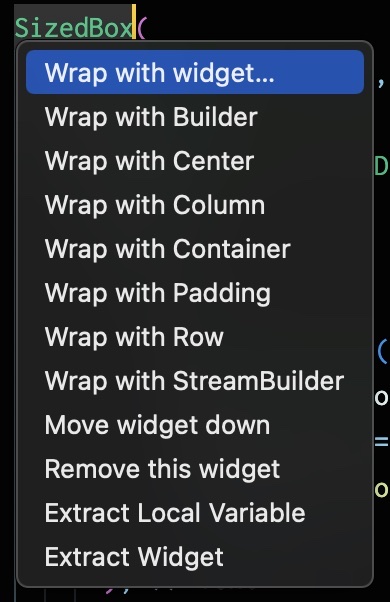
- Suggested refactor actions (widget wrapping, abstracting etc.)
- Autocompletes widget method's boilerplate (think before AI era)
Similarities
| React Native | Flutter | |
|---|---|---|
| Building block | Component | Widget |
| UI compilation | Render | build |
| Data flow | Unidirectional | Unidirectional |
| UI paradigm | Declarative | Declarative |
| Lifecycle | Mount, update, unmount | initState, didUpdateWidget, dispose |
| Native module usage | JS to swift/kotlin | Dart to swift/kotlin |
| 3rd party packages | Npm | pub |
| Async result | Promise | Future |
Lifecycle: Mount / Init
React Native
import React, { useEffect, useState } from 'react'; import { View, Text, TouchableOpacity } from 'react-native'; function LifecycleComponent() { const [count, setCount] = useState(0); const [data, setData] = useState(null); useEffect(() => { // Mount: runs once when component mounts console.log('Component mounted'); // Async operation returning a Promise fetchData().then(result => setData(result)); return () => { // Unmount: cleanup function console.log('Component will unmount'); }; }, []); useEffect(() => { // Update: runs when count changes console.log('Count updated:', count); }, [count]); const fetchData = () => { return new Promise(resolve => { setTimeout(() => resolve('Data loaded'), 1000); }); }; return ( <View> <Text>Count: {count}</Text> <Text>Data: {data}</Text> <TouchableOpacity onPress={() => setCount(count + 1)}> <Text>Increment</Text> </TouchableOpacity> </View> ); }
Flutter
class LifecycleWidget extends StatefulWidget { @override _LifecycleWidgetState createState() => _LifecycleWidgetState(); } class _LifecycleWidgetState extends State<LifecycleWidget> { int count = 0; String? data; @override void initState() { // Mount: runs once when widget is inserted super.initState(); print('Widget initialized'); // Async operation returning a Future fetchData().then((result) => setState(() => data = result)); } @override void didUpdateWidget(LifecycleWidget oldWidget) { // Update: runs when widget configuration changes super.didUpdateWidget(oldWidget); print('Widget updated'); } @override void dispose() { // Unmount: cleanup when widget is removed print('Widget disposed'); super.dispose(); } Future<String> fetchData() async { await Future.delayed(Duration(seconds: 1)); return 'Data loaded'; } @override Widget build(BuildContext context) { return Column( children: [ Text('Count: $count'), Text('Data: ${data ?? "Loading..."}'), ElevatedButton( onPressed: () => setState(() => count++), child: Text('Increment'), ), ], ); } }
Lifecycle: Update
React Native
import React, { useEffect, useState } from 'react'; import { View, Text, TouchableOpacity } from 'react-native'; function LifecycleComponent() { const [count, setCount] = useState(0); const [data, setData] = useState(null); useEffect(() => { // Mount: runs once when component mounts console.log('Component mounted'); // Async operation returning a Promise fetchData().then(result => setData(result)); return () => { // Unmount: cleanup function console.log('Component will unmount'); }; }, []); useEffect(() => { // Update: runs when count changes console.log('Count updated:', count); }, [count]); const fetchData = () => { return new Promise(resolve => { setTimeout(() => resolve('Data loaded'), 1000); }); }; return ( <View> <Text>Count: {count}</Text> <Text>Data: {data}</Text> <TouchableOpacity onPress={() => setCount(count + 1)}> <Text>Increment</Text> </TouchableOpacity> </View> ); }
Flutter
class LifecycleWidget extends StatefulWidget { @override _LifecycleWidgetState createState() => _LifecycleWidgetState(); } class _LifecycleWidgetState extends State<LifecycleWidget> { int count = 0; String? data; @override void initState() { // Mount: runs once when widget is inserted super.initState(); print('Widget initialized'); // Async operation returning a Future fetchData().then((result) => setState(() => data = result)); } @override void didUpdateWidget(LifecycleWidget oldWidget) { // Update: runs when widget configuration changes super.didUpdateWidget(oldWidget); print('Widget updated'); } @override void dispose() { // Unmount: cleanup when widget is removed print('Widget disposed'); super.dispose(); } Future<String> fetchData() async { await Future.delayed(Duration(seconds: 1)); return 'Data loaded'; } @override Widget build(BuildContext context) { return Column( children: [ Text('Count: $count'), Text('Data: ${data ?? "Loading..."}'), ElevatedButton( onPressed: () => setState(() => count++), child: Text('Increment'), ), ], ); } }
Lifecycle: Unmount / Dispose
React Native
import React, { useEffect, useState } from 'react'; import { View, Text, TouchableOpacity } from 'react-native'; function LifecycleComponent() { const [count, setCount] = useState(0); const [data, setData] = useState(null); useEffect(() => { // Mount: runs once when component mounts console.log('Component mounted'); // Async operation returning a Promise fetchData().then(result => setData(result)); return () => { // Unmount: cleanup function console.log('Component will unmount'); }; }, []); useEffect(() => { // Update: runs when count changes console.log('Count updated:', count); }, [count]); const fetchData = () => { return new Promise(resolve => { setTimeout(() => resolve('Data loaded'), 1000); }); }; return ( <View> <Text>Count: {count}</Text> <Text>Data: {data}</Text> <TouchableOpacity onPress={() => setCount(count + 1)}> <Text>Increment</Text> </TouchableOpacity> </View> ); }
Flutter
class LifecycleWidget extends StatefulWidget { @override _LifecycleWidgetState createState() => _LifecycleWidgetState(); } class _LifecycleWidgetState extends State<LifecycleWidget> { int count = 0; String? data; @override void initState() { // Mount: runs once when widget is inserted super.initState(); print('Widget initialized'); // Async operation returning a Future fetchData().then((result) => setState(() => data = result)); } @override void didUpdateWidget(LifecycleWidget oldWidget) { // Update: runs when widget configuration changes super.didUpdateWidget(oldWidget); print('Widget updated'); } @override void dispose() { // Unmount: cleanup when widget is removed print('Widget disposed'); super.dispose(); } Future<String> fetchData() async { await Future.delayed(Duration(seconds: 1)); return 'Data loaded'; } @override Widget build(BuildContext context) { return Column( children: [ Text('Count: $count'), Text('Data: ${data ?? "Loading..."}'), ElevatedButton( onPressed: () => setState(() => count++), child: Text('Increment'), ), ], ); } }
Async: Promise / Future
React Native
import React, { useEffect, useState } from 'react'; import { View, Text, TouchableOpacity } from 'react-native'; function LifecycleComponent() { const [count, setCount] = useState(0); const [data, setData] = useState(null); useEffect(() => { // Mount: runs once when component mounts console.log('Component mounted'); // Async operation returning a Promise fetchData().then(result => setData(result)); return () => { // Unmount: cleanup function console.log('Component will unmount'); }; }, []); useEffect(() => { // Update: runs when count changes console.log('Count updated:', count); }, [count]); const fetchData = () => { return new Promise(resolve => { setTimeout(() => resolve('Data loaded'), 1000); }); }; return ( <View> <Text>Count: {count}</Text> <Text>Data: {data}</Text> <TouchableOpacity onPress={() => setCount(count + 1)}> <Text>Increment</Text> </TouchableOpacity> </View> ); }
Flutter
class LifecycleWidget extends StatefulWidget { @override _LifecycleWidgetState createState() => _LifecycleWidgetState(); } class _LifecycleWidgetState extends State<LifecycleWidget> { int count = 0; String? data; @override void initState() { // Mount: runs once when widget is inserted super.initState(); print('Widget initialized'); // Async operation returning a Future fetchData().then((result) => setState(() => data = result)); } @override void didUpdateWidget(LifecycleWidget oldWidget) { // Update: runs when widget configuration changes super.didUpdateWidget(oldWidget); print('Widget updated'); } @override void dispose() { // Unmount: cleanup when widget is removed print('Widget disposed'); super.dispose(); } Future<String> fetchData() async { await Future.delayed(Duration(seconds: 1)); return 'Data loaded'; } @override Widget build(BuildContext context) { return Column( children: [ Text('Count: $count'), Text('Data: ${data ?? "Loading..."}'), ElevatedButton( onPressed: () => setState(() => count++), child: Text('Increment'), ), ], ); } }
Differences
| React Native | Flutter | |
|---|---|---|
| Child/children | Mostly implicit | Explicit |
| Library management | Hard to figure out | Less option, easier to handle |
| Argument | Only named props | Positional and named arguments |
| Type system | Easy to disable | Strict type system |
| Plugins/extension | No official IDE extension | Official one comprehensive |
| Web support | Similar library advantage | Canvas is no good |
| UI View | Uses native components | Draws every pixel |
| Adaption | Mostly from web developers | Native or backend developers |
Child/Children: Implicit vs Explicit
React Native - Implicit
import React from 'react'; import { View, Text } from 'react-native'; function Card({ children }) { return ( <View style={{ padding: 20 }}> {children} </View> ); } function App() { return ( <Card> <Text>Title</Text> <Text>Description</Text> </Card> ); }
Flutter - Explicit
import 'package:flutter/material.dart'; class CardWidget extends StatelessWidget { final Widget child; CardWidget({required this.child}); @override Widget build(BuildContext context) { return Container( padding: EdgeInsets.all(20), child: child, ); } } class MyApp extends StatelessWidget { @override Widget build(BuildContext context) { return CardWidget( child: Column( children: [ Text('Title'), Text('Description'), ], ), ); } }
Arguments: Named Props vs Positional & Named
React Native - Only Named Props
import React from 'react'; import { View, Text } from 'react-native'; function Button({ title, onPress, color, disabled }) { return ( <TouchableOpacity onPress={onPress} disabled={disabled} style={{ backgroundColor: color }}> <Text>{title}</Text> </TouchableOpacity> ); } function App() { return ( <Button title="Click me" onPress={() => console.log('Pressed')} color="blue" disabled={false} /> ); }
Flutter - Positional & Named Arguments
import 'package:flutter/material.dart'; class CustomButton extends StatelessWidget { final String title; // Positional final VoidCallback onPressed; // Positional final Color? color; // Named (optional) final bool? disabled; // Named (optional) CustomButton( this.title, this.onPressed, {this.color, this.disabled = false} ); @override Widget build(BuildContext context) { return ElevatedButton( onPressed: disabled! ? null : onPressed, style: ElevatedButton.styleFrom( backgroundColor: color ?? Colors.blue, ), child: Text(title), ); } } class MyApp extends StatelessWidget { @override Widget build(BuildContext context) { return CustomButton( 'Click me', () => print('Pressed'), color: Colors.blue, disabled: false, ); } }
Flutter Web - HTML DOM
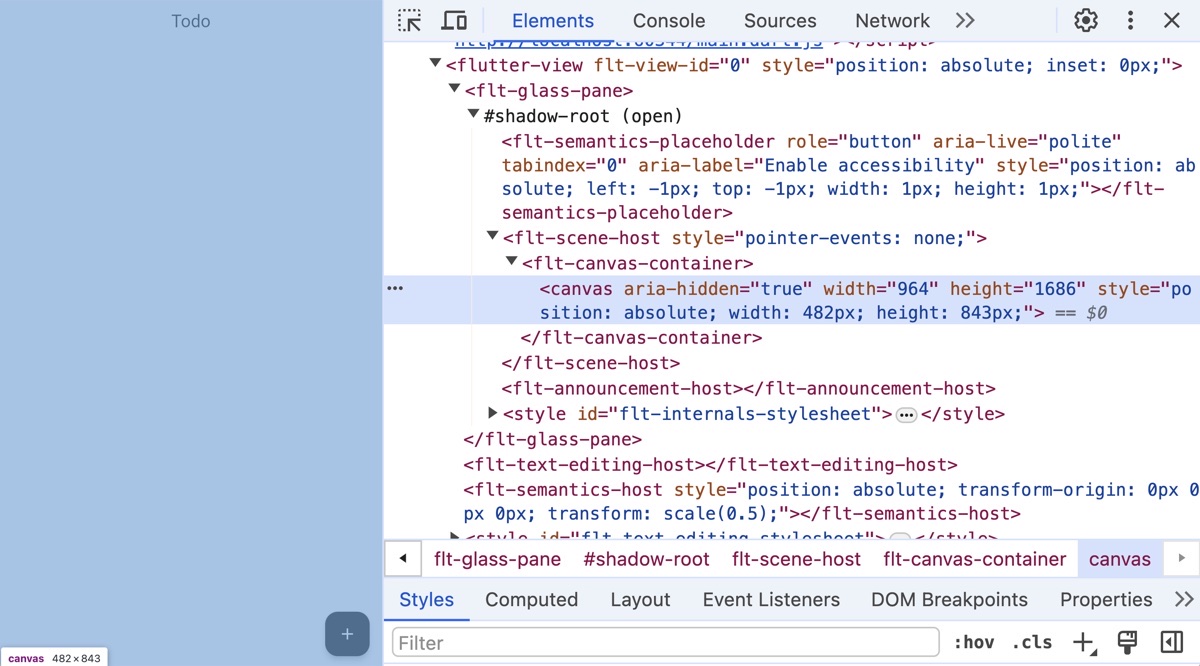
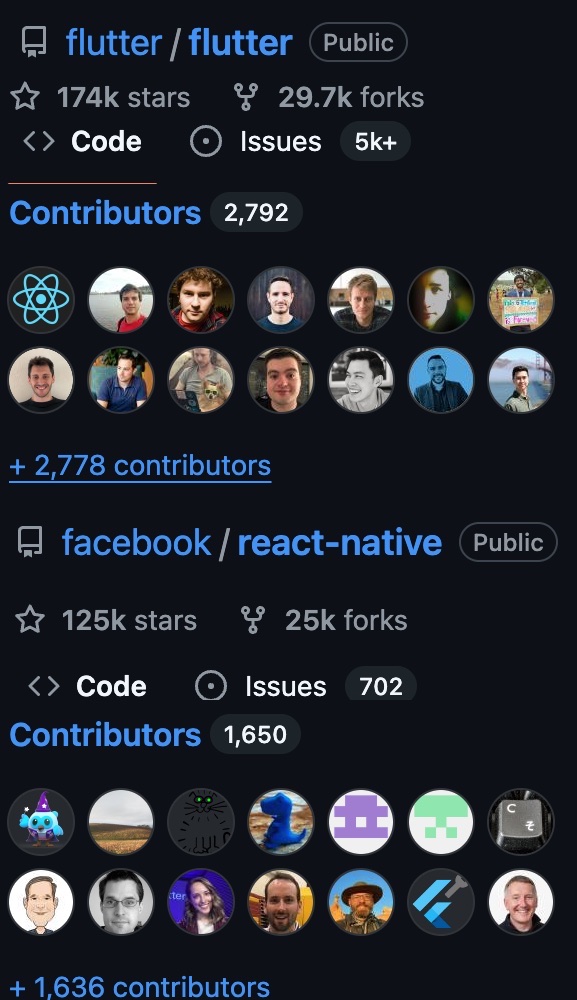
trends.builtwith.com -> React 55m, Flutter 38k
Community and Ecosystem
- RN's ecosystem is bigger but Flutter is more opinionated
- Improving each other: flutter_hooks, OTA update
- Events & Conferences: Flutter reduces the gap in recent years
Technology Choice

Single Developer

- Which one is productive for you?
- Less thinking, easy to prototype → Flutter
- Future investment (Backend, cli tool, web) → React Native
- Documentation and where to start → Flutter
- Consistent tooling → Flutter
Startup

- Time to MVP
- Developer market
- Short, middle, long term plans
- Previous experience of devs
Enterprise

- What other companies choose in same domain
- Developer market
- Using same resources for different projects
- Long term plans to not risk ongoing process
- Regional choices
- Other platforms (car, tv, watch, VR)
Regional Job Market Overview
| Region | Job Ratio (RN:Flutter) | RN Dominance | Key Insight |
|---|---|---|---|
| 🇺🇸 North America | 6:1 | ⚫⚫⚫⚫⚫ Very High | Most RN-dominated market |
| 🇪🇺 Europe | 3:1 | ⚫⚫⚫⚪⚪ High | Flutter gaining in new projects (52%) |
| 🌏 Asia | 1.5:1 | ⚫⚫⚪⚪⚪ Balanced | Most balanced market, Flutter leads in China |
| 🌍 Middle East | 2:1 | ⚫⚫⚫⚪⚪ Moderate | Flutter booming in fintech/startups |
| 🌎 Latin America | 2:1 | ⚫⚫⚫⚪⚪ Moderate | RN slightly ahead |
| 🌐 Global Average | 2.5:1 | ⚫⚫⚫⚪⚪ Moderate | RN leads overall |

Loading presentation…